1. What is Amazon DocumentDB?
Amazon DocumentDB is a fully managed document database service designed for JSON workloads. It is compatible with the MongoDB API and drivers, making it easy to migrate existing MongoDB applications to AWS.
Core Concept DocumentDB is “MongoDB-compatible.” It implements the MongoDB 3.6, 4.0, and 5.0 API, so existing MongoDB drivers, tools, and applications work with DocumentDB with little or no changes. However, it is NOT MongoDB under the hood — it uses an Aurora-like distributed storage engine.
2. Key Characteristics
- MongoDB-compatible API (not a fork, but compatible at the driver/API level)
- Fully managed: automated patching, backups, monitoring, scaling
- Storage: auto-scales in 10 GiB increments up to 128 TiB
- Storage is replicated 6 copies across 3 AZs (Aurora-like architecture)
- Up to 15 read replicas with sub-10ms replication lag
- Automatic failover (typically <30 seconds)
- Continuous backup to S3 with point-in-time recovery (up to 35 days)
- Encryption at rest (KMS) and in transit (TLS)
- VPC-only (no public endpoint)
3. DocumentDB Architecture
DocumentDB Architecture (Aurora-like):

  ┌─────────────────────────────────────┐
  │  Compute Layer (Instances)          │
  │  Writer (Primary) + up to 15 Readers│
  └─────────────────────────────────────┘
                    |
  ┌──────────────────────────────────────┐
  │  Shared Storage Layer                │
  │  6 copies across 3 AZs               │
  │  Auto-scales to 128 TiB              │
  └──────────────────────────────────────┘
4. DocumentDB Elastic Clusters
- Horizontal scaling via sharding (partition data across multiple shards)
- Scales to millions of reads/writes per second and petabytes of storage
- Automatic shard management — no manual partitioning
- Use for: high-throughput, high-storage workloads that exceed single-cluster limits
5. DocumentDB vs DynamoDB
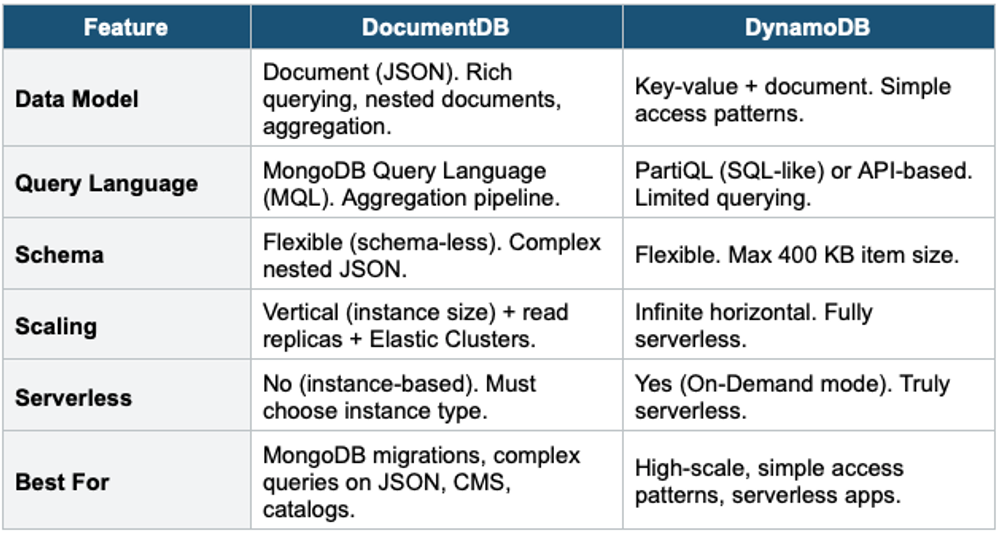
6. Migrating from MongoDB to DocumentDB
- Use AWS Database Migration Service (DMS) for continuous replication from MongoDB to DocumentDB
- Existing MongoDB drivers and tools work with DocumentDB (change the connection string)
- Some MongoDB features are NOT supported: certain aggregation operators, change streams syntax differences, full-text search (use OpenSearch instead)
- Test compatibility using the Amazon DocumentDB Compatibility Tool
7. DocumentDB Global Clusters
- Cross-Region replication for disaster recovery and global reads
- 1 primary Region (read/write) + up to 5 secondary Regions (read-only)
- Replication lag: typically <1 second
- Promote secondary to primary in <1 minute
- Similar to Aurora Global Database
8. When to use
Use DocumentDB when you need a fully managed, scalable document database compatible with MongoDB on AWS.
Common scenarios:
- MongoDB migration — Move existing MongoDB workloads to AWS without rewriting application code.
- Content management — Store articles, profiles, and product catalogs with flexible schemas.
- User profiles — Store varying user attributes without a rigid table structure.
- Mobile/web backends — Flexible JSON document storage for modern applications.
- Catalog and inventory — Products with different attributes that don't fit a fixed schema.
- Real-time big data — Store and query semi-structured data at scale.
Exam Tip DocumentDB questions: "MongoDB migration to AWS" = DocumentDB. "MongoDB-compatible" = DocumentDB. "JSON document database with complex queries" = DocumentDB. "Simple key-value at massive scale" = DynamoDB (not DocumentDB). DocumentDB has Aurora-like storage (6 copies, 3 AZs, auto-scales to 128 TiB). "Sharding for DocumentDB" = Elastic Clusters.