1. What is Amazon RDS?
Amazon Relational Database Service (RDS) is a fully managed service that makes it easy to set up, operate, and scale relational databases in the cloud. AWS handles provisioning, patching, backup, recovery, failure detection, and repair.
Managed vs Unmanaged RDS is MANAGED: AWS handles OS patching, DB engine patching, backups, Multi-AZ failover, monitoring, and scaling storage. You handle: schema design, query optimization, DB parameter tuning, IAM access, and Security Group configuration. You CANNOT SSH into an RDS instance.
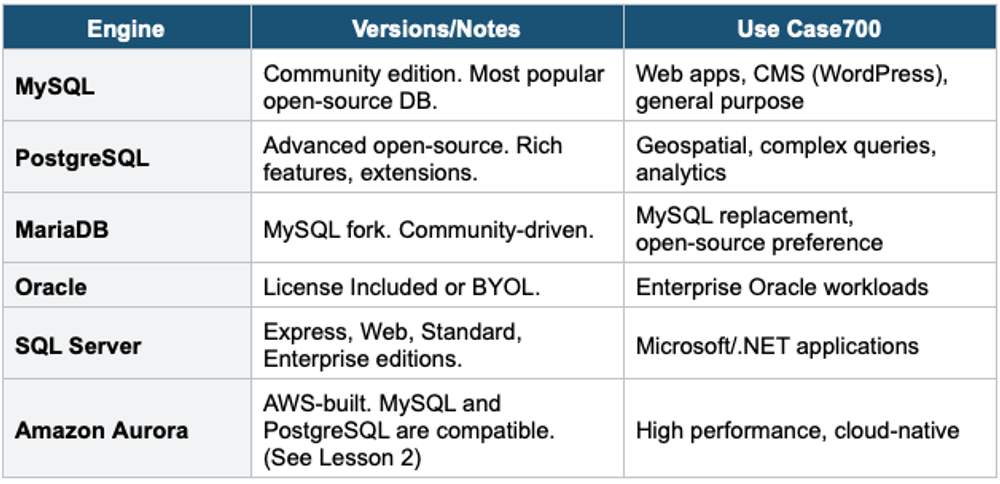
2. Supported Engines
3. RDS Multi-AZ Deployments
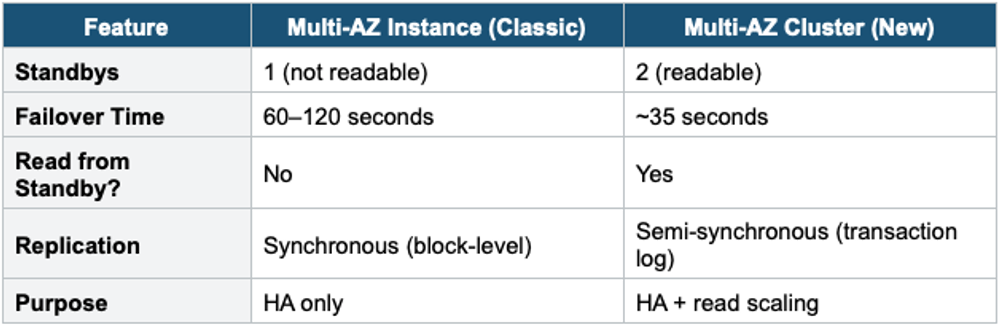
Multi-AZ provides high availability by maintaining a synchronous standby replica in a different AZ. Failover is automatic.
Multi-AZ Instance (Classic)
- One primary DB instance + one standby replica in a different AZ
- Synchronous replication (every write is copied to the standby before being acknowledged)
- Standby is NOT accessible for reads — it’s only for failover
- Automatic failover: DNS endpoint switches to standby (typically 60–120 seconds)
- No manual intervention needed. Applications use the same DNS endpoint.
- Use for: production databases requiring high availability
Multi-AZ Cluster (New)
- One primary (writer) + two readable standbys in different AZs
- Standbys are accessible for read queries (unlike classic Multi-AZ)
- Faster failover: ~35 seconds (vs 60–120 for classic)
- Uses semi-synchronous replication + transaction log-based replication
- Supported on MySQL and PostgreSQL
- Writer endpoint + reader endpoint + instance endpoints
4. RDS Read Replicas
Read Replicas provide read scaling by creating asynchronous copies of your primary database that handle read-only queries.
- Up to 15 Read Replicas per DB instance (Aurora) or 5 for other engines
- Asynchronous replication — slight replication lag (eventually consistent)
- Replicas are accessible for read queries (SELECT), reducing load on the primary
- Can be in the same AZ, cross-AZ (free data transfer), or cross-Region (data transfer charges)
- Can be promoted to a standalone DB instance (breaks replication permanently)
- Read Replicas can have their own Read Replicas (chaining) for some engines
Multi-AZ vs Read Replicas Multi-AZ = HIGH AVAILABILITY (automatic failover, standby not readable in classic). Read Replica = READ SCALING (offload reads, asynchronous, always readable). They solve different problems and can be used together: a Read Replica can have its own Multi-AZ standby.
5. RDS Automated Backups
- Automatic daily full snapshot + transaction log backups every 5 minutes
- Enables Point-in-Time Recovery (PITR) to any second within the retention window
- Retention period: 1–35 days (default 7 days). Set to 0 to disable.
- Backups taken during a configurable backup window (brief I/O suspension on single-AZ)
- Backups stored in S3 (managed by AWS, you don’t see the bucket)
- Deleted when you delete the DB instance (unless you keep a final snapshot)
Manual DB Snapshots
- User-initiated snapshots taken at any time
- Retained until you explicitly delete them (unlike automated backups)
- Can be copied across Regions (for DR)
- Can be shared with other AWS accounts
- Use for: long-term retention, migration, before major changes
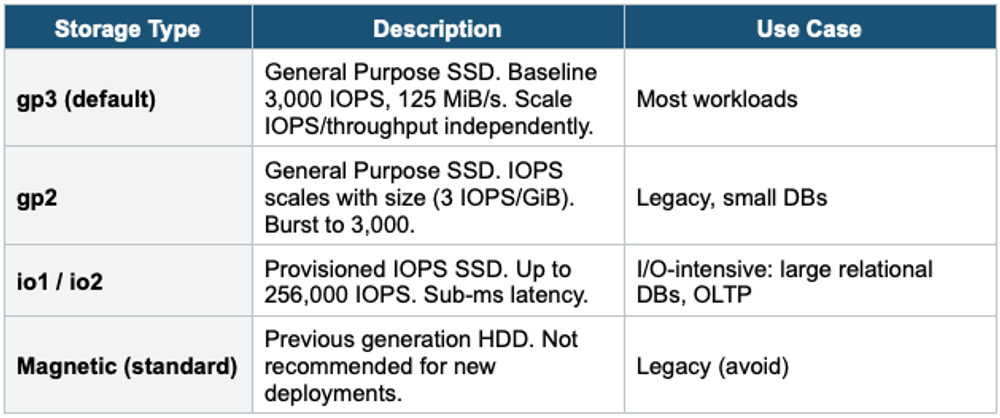
6. RDS Storage
- Automatically increases storage when free space is low
- You set a Maximum Storage Threshold
- Triggered when: free storage < 10% AND low storage lasts 5+ minutes AND 6+ hours since last modification
- No downtime — scaling happens online
- Useful for unpredictable workloads
7. RDS Security
- Encryption at rest: AES-256 via KMS. Must be enabled at creation (cannot encrypt existing unencrypted DB)
- To encrypt an existing DB: create snapshot → copy with encryption → restore from encrypted snapshot
- Encryption in transit: SSL/TLS connections (enforce via parameter group)
- IAM Database Authentication: supported for MySQL and PostgreSQL (use IAM token instead of password)
- Security Groups: control network access at the instance level
- No SSH access to RDS instances
8. RDS Custom
- RDS Custom gives you access to the underlying OS and database for Oracle and SQL Server
- You can install custom patches, change OS settings, and install agents
- AWS still manages backups, HA, and scaling
- Deactivate RDS automation mode before making OS/DB changes, then reactivate
- Use when: you need features that standard RDS doesn’t support (custom patches, specific Oracle features)
9. When to use
Use RDS when you need a managed relational database without handling infrastructure, patching, backups, or replication yourself.
Common scenarios:
- Traditional relational workloads — Applications that need structured data with SQL queries.
- OLTP (Online Transaction Processing) — E-commerce, banking, user management, order systems.
- Lift-and-shift databases — Move on-premises MySQL, PostgreSQL, Oracle, or SQL Server to AWS.
- Automated backups and recovery — Need point-in-time restore without manual effort.
- High availability — Need automatic failover with Multi-AZ.
Exam Tip RDS questions: "Managed relational database" = RDS. "No SSH access" = RDS (use RDS Custom for OS access). Multi-AZ = HA (not for reads in classic). Read Replica = read scaling (not HA). "Encrypt existing DB" = snapshot → copy encrypted → restore. Storage Auto Scaling = set max threshold. "IAM auth for MySQL" = IAM Database Authentication. PITR = up to 35 days. "Oracle/SQL Server with OS access" = RDS Custom.