1. What is an AMI?
An Amazon Machine Image (AMI) is a template that contains the software configuration (OS, application server, applications) required to launch an EC2 instance. Think of it as a snapshot of a complete server that you can use to create identical instances.
AMI Contains
- Root volume template (OS, installed software)
- Launch permissions (who can use the AMI)
- Block device mapping (which EBS volumes to attach at launch)
2. AMI Types by Source
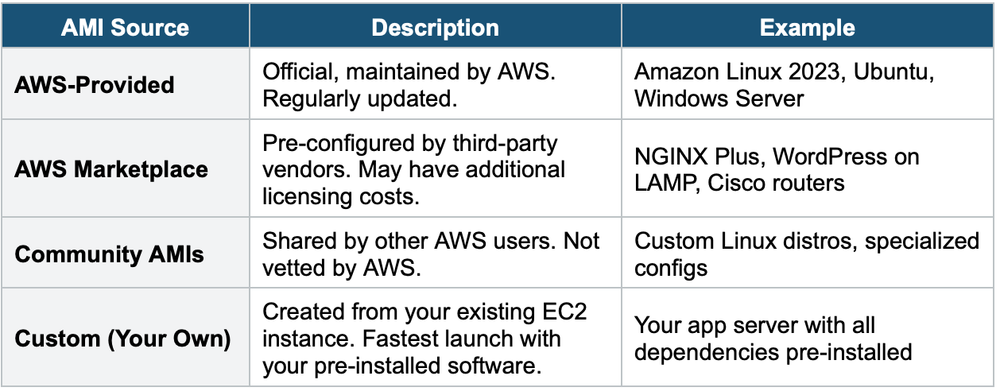
3. Creating a Custom AMI
You can create your own AMI from a running or stopped EC2 instance:
- Step 1: Launch an EC2 instance and configure it (install software, configure settings)
- Step 2: Stop the instance (recommended for data integrity, not required)
- Step 3: Create an AMI from the instance (Right-click → Image → Create Image)
- Step 4: AWS creates EBS snapshots of the instance’s volumes
- Step 5: The AMI is registered and can be used to launch new instances
AMI Key Facts
- AMIs are Region-specific — an AMI in us-east-1 cannot be used in eu-west-1 directly
- You can copy an AMI to another Region (for DR or multi-Region deployment)
- AMIs can be shared with other AWS accounts or made public
- AMIs are backed by EBS snapshots — you pay for snapshot storage
- AMIs significantly speed up boot time (no need to run User Data scripts)
Golden AMI Pattern Create a "golden AMI" with all software pre-installed, security patches applied, and configurations set. Use this as the standard image for all instances. This ensures consistency, speeds up launches, and reduces User Data complexity. Combine with EC2 Image Builder for automated updates.
4. EC2 Image Builder
EC2 Image Builder is a fully managed service that automates the creation, testing, and distribution of AMIs (and container images).
How It Works
- Step 1 — Define a Recipe: Specify the base image (e.g., Amazon Linux 2023) and the components to install (software, patches, configurations).
- Step 2 — Build: Image Builder launches a temporary EC2 instance, runs the recipe, and creates an AMI.
- Step 3 — Test: Runs automated tests on the image (e.g., does the web server start? Is SSH accessible?).
- Step 4 — Distribute: Copies the AMI to specified Regions and/or shares with specified accounts.
Key Features
- Fully automated — no manual EC2 management
- Schedule-based (e.g., weekly) or triggered by new base AMI release
- Can output AMIs or Docker container images
- Integrates with AWS Organizations for multi-account distribution
- Free service — you only pay for the underlying EC2, EBS, and snapshot resources
- Supports versioning of images
Image Builder Components
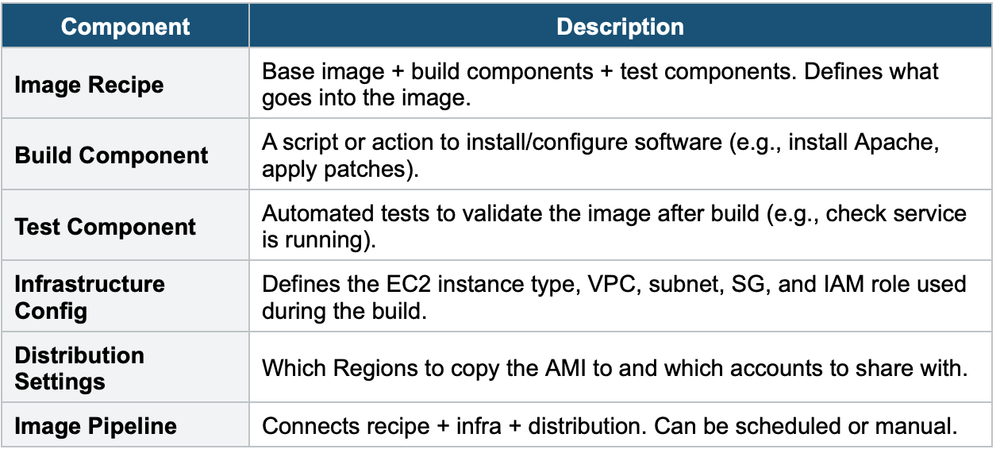
5. AMI Lifecycle
- Create: From an EC2 instance or via Image Builder
- Register: AMI is registered and available in the Region
- Launch: Use the AMI to launch new instances
- Copy: Copy across Regions for DR/multi-Region
- Share: Share with other accounts or make public
- Deprecate: Mark as deprecated (still usable but shows a warning)
- Deregister: Remove the AMI registration (snapshots remain until you delete them)
6. When to use AMI
- Launch identical instances — every instance from the same AMI is identical.
- Pre-bake software — install and configure everything ahead of time for fast boot.
- Golden image strategy — standardize OS + patches + software across the organization.
- Auto Scaling — launch template references an AMI for consistent fleet deployments.
- Disaster recovery — copy AMI cross-region for standby instances.
7. When to use EC2 Image Builder
- Automate AMI creation — no manual instance customization.
- Patch management — automatically rebuild AMIs with the latest OS patches on a schedule.
- Compliance — ensure all images meet security standards before distribution.
- Golden image pipeline — build → test → distribute standardized images across accounts and regions.
- Container images — build Docker images with the same pipeline approach.
Exam Tip AMI questions: "Fastest way to launch pre-configured instances" = Custom AMI (golden AMI). "Automate AMI creation and patching" = EC2 Image Builder. "Deploy the same instance in another Region" = Copy AMI to that Region. AMIs are Region-specific. Image Builder is free (you pay for EC2/EBS used during build). AMIs are backed by EBS snapshots.