1. What is AWS Backup?
AWS Backup is a fully managed, centralized backup service that automates and manages backups across AWS services. Instead of managing backups separately for each service, AWS Backup provides a single place to configure, schedule, and monitor all your backups.
Core Concept AWS Backup = one service to back up everything. Instead of writing separate backup scripts for EC2, EBS, RDS, DynamoDB, EFS, FSx, and more, you create a single Backup Plan in AWS Backup and it handles all of them with consistent policies.
2. Supported Services
- EC2 instances (AMI-based backup)
- EBS volumes (snapshot-based)
- Amazon RDS (all engines) and Aurora
- Amazon DynamoDB
- Amazon EFS
- Amazon FSx (all types)
- Amazon S3
- AWS Storage Gateway (Volume Gateway)
- Amazon DocumentDB, Neptune
- VMware workloads (on-premises via AWS Backup gateway)
3. Key Concepts
- Backup Plan: Defines WHEN to back up (schedule), HOW LONG to keep backups (retention), and WHERE to store them (backup vault). You create one plan and assign resources to it.
- Backup Vault: A storage container for backups. Encrypted with KMS. You can set Vault Lock for WORM compliance (see below). Vaults can be in different Regions for DR.
- Backup Rule: A specific schedule within a plan: frequency (hourly, daily, weekly, monthly), retention period, lifecycle (transition to cold storage after N days), and copy to another Region.
Resource Assignment: Select which resources a plan protects: by resource ID, by tag (e.g., Backup=true), or by resource type.
4. Key Features
Cross-Region Backup
- Automatically copy backups to another Region for disaster recovery
- Configured as part of the Backup Rule
- Supports: EBS, RDS, DynamoDB, EFS, FSx, EC2, S3, and more
Cross-Account Backup
- Copy backups to another AWS account (via AWS Organizations)
- Protects against account-level compromise or accidental deletion
- Managed through AWS Backup policies in Organizations
AWS Backup Vault Lock
- Enforces WORM (Write Once Read Many) policy on a backup vault
- Backups in a locked vault CANNOT be deleted by anyone, including the root user
- Even AWS cannot delete them — truly immutable
- Used for compliance: SEC, HIPAA, and financial regulations
Important Warning Vault Lock is irreversible. Once applied in Compliance mode and the cool-off period passes, no one can delete backups before the retention period expires. Ensure your retention settings are correct before enabling Vault Lock.
Point-in-Time Recovery (PITR)
- Supported for: DynamoDB, RDS, Aurora, S3
- Restore to any second within the retention window
- DynamoDB: up to 35 days. RDS/Aurora: up to 35 days. S3: continuous.
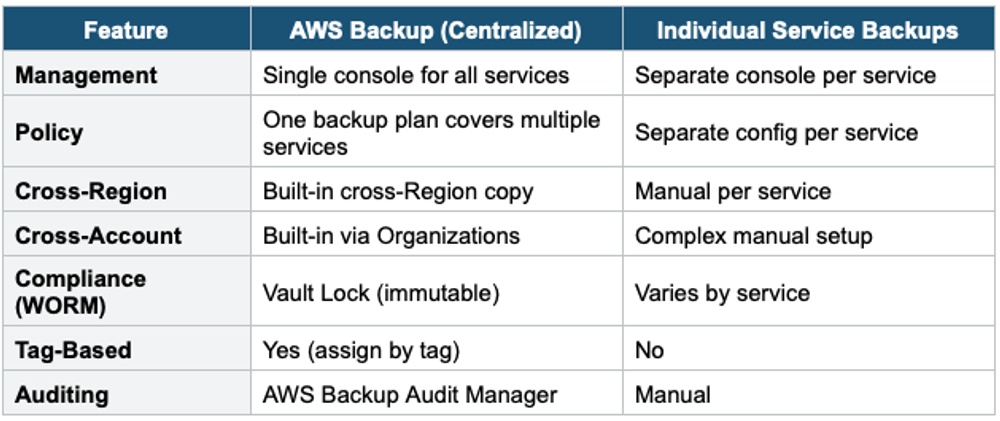
5. AWS Backup vs Individual Service Backups
6 AWS Backup Audit Manager
- Monitors and evaluates backup compliance across your organization
- Pre-built compliance frameworks (or custom): checks if resources are backed up, retention met, cross-Region enabled, encryption active
- Generates audit-ready compliance reports
- Integrates with AWS Config for automated compliance checks
Exam Tip AWS Backup: "Centralized backup for all AWS services" = AWS Backup. "Cross-Region DR" = AWS Backup cross-Region copy. "Immutable backups for compliance" = Vault Lock. "Tag-based backup" = AWS Backup resource assignment by tag. "Cross-account backup" = AWS Backup + Organizations. "Audit backup compliance" = Backup Audit Manager. Use AWS Backup instead of manual per-service backups for any multi-service architecture.