1. What is CloudFormation?
AWS CloudFormation is an Infrastructure as Code (IaC) service that lets you define your entire AWS infrastructure in a declarative template file (JSON or YAML). CloudFormation creates, updates, and deletes resources automatically based on the template.
Core Concept
CloudFormation = write a template describing your infrastructure → CloudFormation provisions it. Change the template → CloudFormation updates only what changed. Delete the stack → CloudFormation removes everything. Repeatable, version-controlled, and automated infrastructure management.
2. Key Concepts
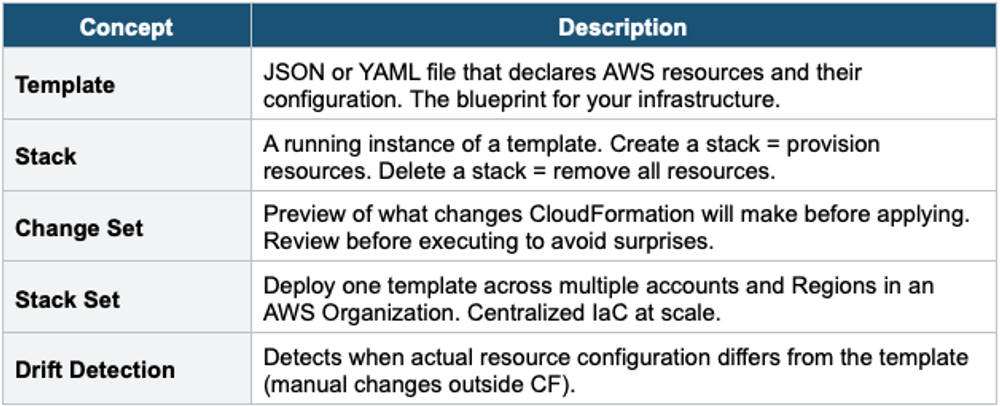
3. Template Sections
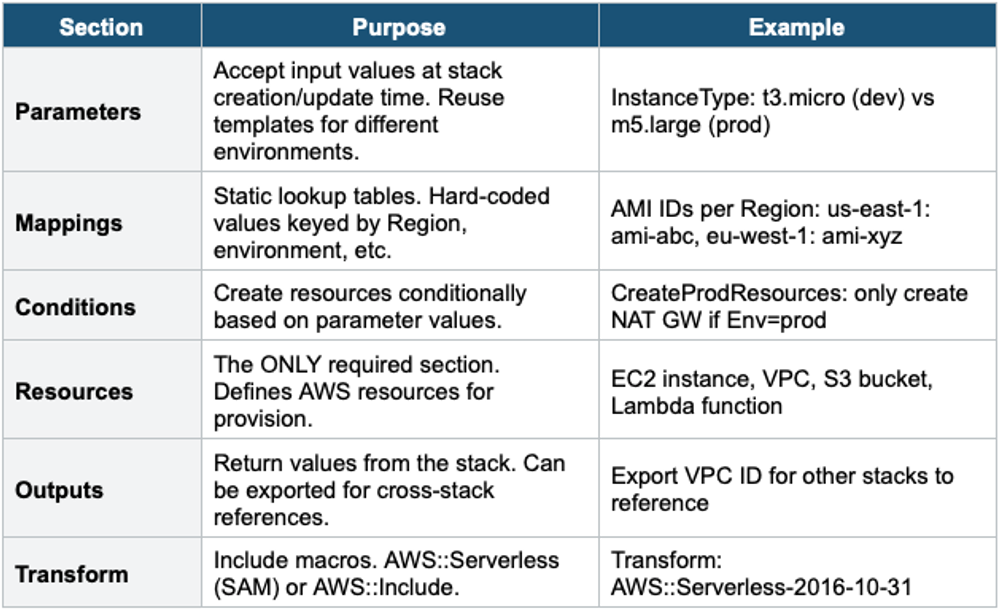
CloudFormation Template Structure:

AWSTemplateFormatVersion: '2010-09-09'
Description: My infrastructure template

Parameters:       # Input values (instance type, env name)
Mappings:         # Static key-value lookup tables
Conditions:       # Conditional resource creation
Resources:        # AWS resources to create (REQUIRED, only mandatory section)
Outputs:          # Values to export (VPC ID, ALB DNS, etc.)
Metadata:         # Template metadata
Rules:            # Validate parameter values
Transform:        # Include macros (SAM, includes)
Template Sections Detail
4. Template Example
# Simple CloudFormation Template (YAML)
AWSTemplateFormatVersion: '2010-09-09'
Description: Web server with security group

Parameters:
  InstanceType:
    Type: String
    Default: t3.micro
    AllowedValues: [t3.micro, t3.small, t3.medium]
  Environment:
    Type: String
    AllowedValues: [dev, staging, prod]

Conditions:
  IsProd:!Equals [!Ref Environment, prod]

Resources:
  WebServerSG:
    Type: AWS::EC2::SecurityGroup
    Properties:
      GroupDescription: Allow HTTP
      SecurityGroupIngress:
        - IpProtocol: tcp
          FromPort: 80
          ToPort: 80
          CidrIp: 0.0.0.0/0

  WebServer:
    Type: AWS::EC2::Instance
    Properties:
      InstanceType:!Ref InstanceType
      ImageId: ami-0abcdef1234567890
      SecurityGroupIds:
        - !Ref WebServerSG
      Tags:
        - Key: Environment
          Value:!Ref Environment

Outputs:
  ServerPublicIP:
    Value:!GetAtt WebServer.PublicIp
    Export:
      Name:!Sub ${AWS::StackName}-PublicIP
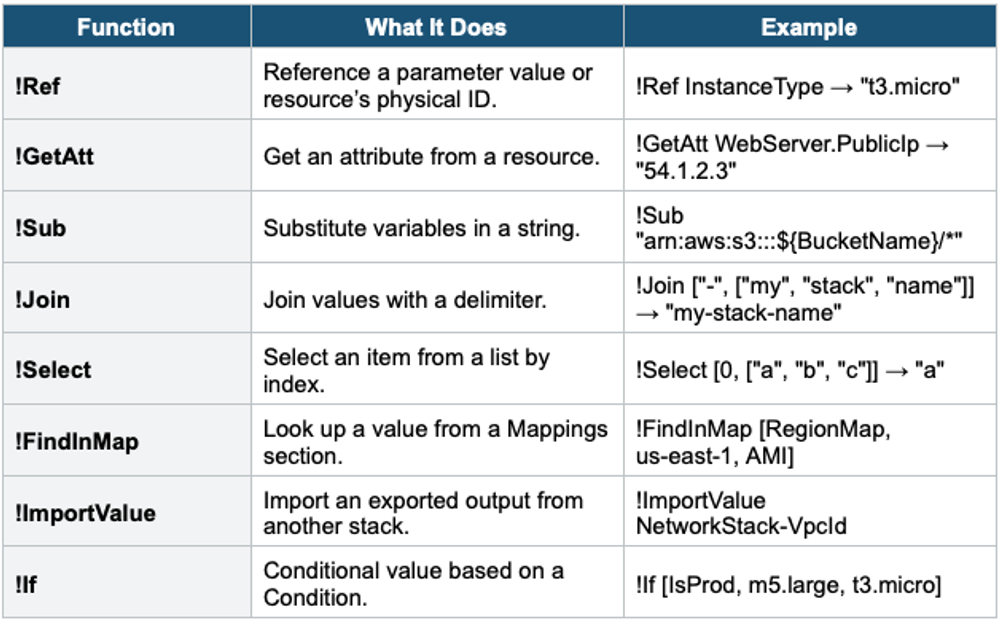
5. Intrinsic Functions
6. Stack Features
Cross-Stack References
- Stack A exports an Output (e.g., VPC ID)
- Stack B imports it with!ImportValue
- Creates dependency: Stack A must exist before Stack B
- Use for: separate networking, compute, and database into independent stacks
Nested Stacks
- A stack can include other stacks as resources (AWS::CloudFormation::Stack)
- Parent stack manages child stacks. Child stacks are templates stored in S3.
- Use for: reusable components (e.g., a VPC template reused across projects)
- Different from cross-stack: nested = parent-child hierarchy; cross-stack = independent stacks sharing exports
Stack Policies
- JSON policy that protects specific resources from being updated or deleted during stack updates
- Example: prevent accidental replacement of an RDS database during stack update
- Applied to the stack (not the template)
Rollback
- If stack creation fails, all resources are rolled back (deleted) by default
- If the stack update fails: rolls back to the previous known-good state
- Can disable rollback for debugging (see error before cleanup)
- CREATE_FAILED → ROLLBACK_COMPLETE: stack must be deleted and recreated
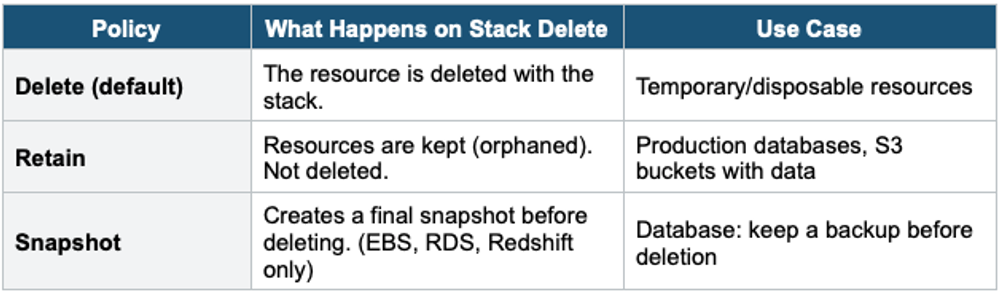
DeletionPolicy
Drift Detection
- Detects when the actual resource config differs from what CloudFormation expects
- Caused by: someone manually changed a resource in the Console/CLI outside CF
- Drift detection does NOT auto-fix — it reports differences
- Fix: update the template to match reality, or re-deploy to enforce template state
7. CloudFormation + CI/CD
- CodePipeline deploy action: CreateChangeSet + ExecuteChangeSet
- Automate infrastructure changes through the same CI/CD pipeline as application code
- Review Change Sets before execution for safety
- Store templates in Git alongside application code
7. When to use
Use CloudFormation when you need to define and provision AWS infrastructure as code using declarative YAML or JSON templates.
Common scenarios:
- Infrastructure as Code (IaC) — Define your entire AWS environment in a template file.
- Repeatable deployments — Deploy the same stack across dev, staging, and production.
- Multi-region / multi-account — Use StackSets to deploy across many accounts and regions.
- Drift detection — Check if someone manually changed resources outside the template.
- Automated rollback — If a deployment fails, CloudFormation rolls back to the previous state.
- Dependency management — CloudFormation figures out the correct order to create/update/delete resources.
Exam Tip
CloudFormation: "Infrastructure as Code" = CloudFormation. "Repeatable infrastructure" = CF. Resources = only required section!Ref = reference parameter/resource. !GetAtt = get attribute. !ImportValue = cross-stack. DeletionPolicy: Retain = keep on delete, Snapshot = backup before delete. "Detect manual changes" = Drift Detection. "Deploy across many accounts" = StackSets. Change Set = preview before applying.