1. Overview
Orchestrates Source → Build → Test → Deploy into an automated workflow. Artifacts via S3.
Core
CodePipeline connects Code* services. Stages run sequentially. Actions within stage: sequential or parallel. Manual Approval for human gates.
2. Action Types
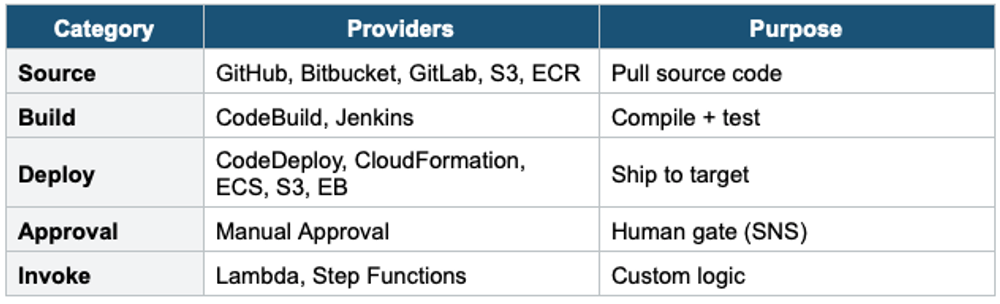
3. Features
- Manual Approval: human gate, SNS notification, 7-day timeout
- Cross-Region: artifacts auto-replicated to target Regions
- Cross-Account: deploy from CI/CD account to workload accounts via IAM roles
- CloudFormation as deploy action: IaC through pipeline
- Triggers: source change (auto), manual, EventBridge schedule
4. When to use
Use CodePipeline when you need to automate and orchestrate the full CI/CD workflow — from source code change to production deployment.
Common scenarios:
- Automated release pipeline — Source → Build → Test → Deploy triggered on every code push.
- Orchestrate multiple AWS tools — Connect CodeCommit/GitHub → CodeBuild → CodeDeploy in one flow.
- Multi-stage deployments — Add manual approval gates before production.
- Cross-region / cross-account deploys — Deploy artifacts to multiple environments.
- Integrate third-party tools — Jenkins, GitHub Actions, Terraform, CloudFormation as pipeline stages.
Exam Tip
CodePipeline = orchestrator. Manual Approval for gates. CFN as a deploy action for IaC. Cross-Region + Cross-Account. Artifacts via S3.