1. AWS Migration Hub
AWS Migration Hub provides a single location to track the progress of application migrations across multiple AWS tools and partner solutions.
Core Concept Migration Hub = single pane of glass for migration. It doesn’t perform the migration itself — it tracks and aggregates progress from MGN, DMS, and partner tools. You see all your applications, their migration status, and progress in one dashboard.
Key Features
- Central dashboard: track migration status across all tools (MGN, DMS, etc.)
- Application grouping: Organize servers and databases into applications
- Migration status: Not Started, In Progress, Completed per application
- Integrates with: MGN, DMS, CloudEndure, partner tools (Atadata, RiverMeadow, etc.)
- Strategy Recommendations: ML-based suggestions for migration strategy per application
- Free (no additional charge for Migration Hub itself)
2. AWS Application Discovery Service
Application Discovery Service helps you plan your migration by collecting information about your on-premises data center.
Core Concept Before migrating, you need to know WHAT you have. Application Discovery Service automatically discovers servers, their configurations, dependencies, and performance data in your on-premises environment. This data feeds into Migration Hub for planning.
Discovery Methods
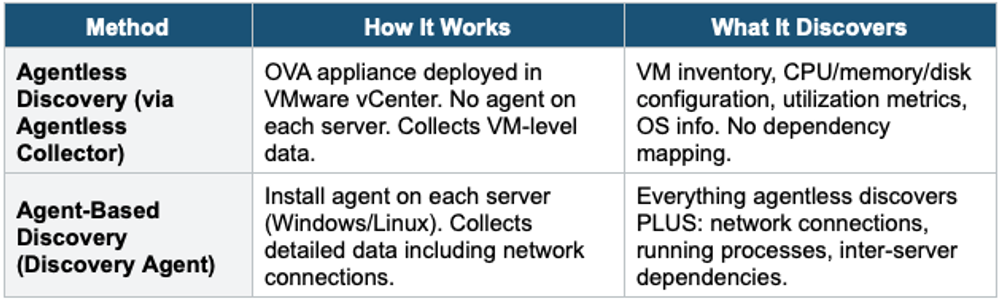
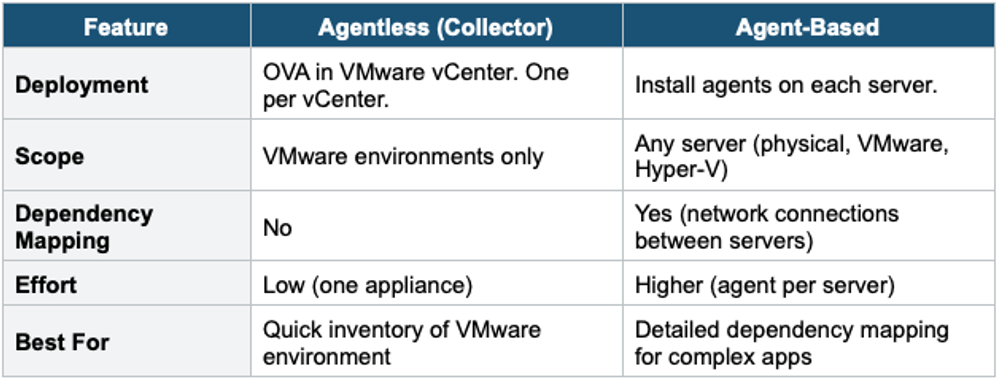
Agentless vs Agent-Based
3. Migration Hub Orchestrator
- Predefined migration workflow templates for common patterns
- Templates for: rehost with MGN, SAP migration, SQL Server migration
- Step-by-step orchestration: checks prerequisites, runs migration steps in order
- Customizable: add/modify steps for your requirements
- Use for: structured, repeatable migration workflows at scale
4. Migration Hub Refactor Spaces
- Helps incrementally refactor applications from monolith to microservices
- Creates an API Gateway + NLB routing layer in front of your application
- Route traffic between monolith (legacy) and new microservices
- Gradually shift endpoints from monolith to microservices (Strangler Fig pattern)
- Use for: refactoring a monolith to microservices while keeping the app running
Strangler Fig Pattern with Refactor Spaces:

Before: Users → Monolith (all features)

During: Users → API Gateway
            /orders   →  New Microservice (Lambda + DynamoDB)
            /products →  New Microservice (ECS + Aurora)
            /*        →  Legacy Monolith (everything else)
After:  Users → API Gateway → All Microservices (monolith retired)
5. When to use
Use these when you need to plan, track, and execute migrations from on-premises to AWS.
Common scenarios:
- Discover what you have — Inventory on-premises servers, apps, and dependencies before migrating.
- Plan migration strategy — Understand which apps depend on each other.
- Track migration progress — Single dashboard to monitor all migration activities across multiple AWS tools.
- Large-scale migrations — Coordinate dozens or hundreds of server migrations.
Exam Tip Migration Hub: "Track migration progress" = Migration Hub (dashboard). "Discover on-premises servers" = Application Discovery Service. "Dependency mapping" = Agent-Based Discovery. "VMware inventory" = Agentless Collector. "Refactor monolith to microservices" = Refactor Spaces (Strangler Fig). Migration Hub is free. Discovery Service data feeds into Migration Hub.