1. Overview
EC2 Placement Groups let you control how your instances are placed on the underlying hardware. Different strategies optimize for different goals: performance, availability, or cost. There are three strategies.
2. Cluster Placement Group
All instances are placed on the same rack (and often the same physical host) within a single Availability Zone. Optimized for the lowest possible network latency between instances.
Key Characteristics
- All instances in the SAME AZ, same rack
- 10 Gbps network bandwidth between instances (enhanced networking)
- Lowest latency, highest throughput (packets-per-second)
- If the rack fails, ALL instances fail simultaneously
Use Cases
- High Performance Computing (HPC)
- Big data jobs requiring fast inter-node communication
- Applications needing extremely low latency (sub-millisecond)
Best Practices
- Use the same instance type for all instances in the group
- Launch all instances at once (if possible) to reduce allocation failures
- Use enhanced networking (ENA) for best performance
Important Warning Cluster = HIGH PERFORMANCE but HIGH RISK. If the rack fails, you lose everything. Never use Cluster for workloads that need high availability. It is the opposite of a Spread group.
3. Spread Placement Group
Each instance is placed on a different physical rack. Designed to minimize the risk of simultaneous failure. Optimized for high availability.
Key Characteristics
- Each instance is on a DIFFERENT rack (different hardware, different power, different network)
- Can span multiple AZs within a Region
- Maximum of 7 instances per AZ per placement group
- If one rack fails, only one instance is affected
Use Cases
- Critical applications that must maximize availability
- Applications where individual instance failure must be isolated
- Primary/secondary database replicas that must not fail together
Spread Limit The 7-instance-per-AZ limit is a hard constraint. If you need more than 7 instances per AZ, consider Partition placement groups instead. With 3 AZs, a Spread group supports a maximum of 21 instances (7 × 3).
4. Partition Placement Group
Instances are divided into logical partitions. Each partition runs on a different rack. Instances in different partitions do NOT share underlying hardware. Designed for large distributed workloads.
Key Characteristics
- Up to 7 partitions per AZ
- Can span multiple AZs
- Hundreds of instances per group (no 7-instance limit like Spread)
- Each partition is on a separate rack — partitions are isolated from each other
- Instances within the SAME partition may share a rack
- You can see which instances are in which partition (metadata available)
Use Cases
- Hadoop, HDFS, HBase
- Apache Cassandra, Apache Kafka
- Any large, distributed, replicated workload that is partition-aware
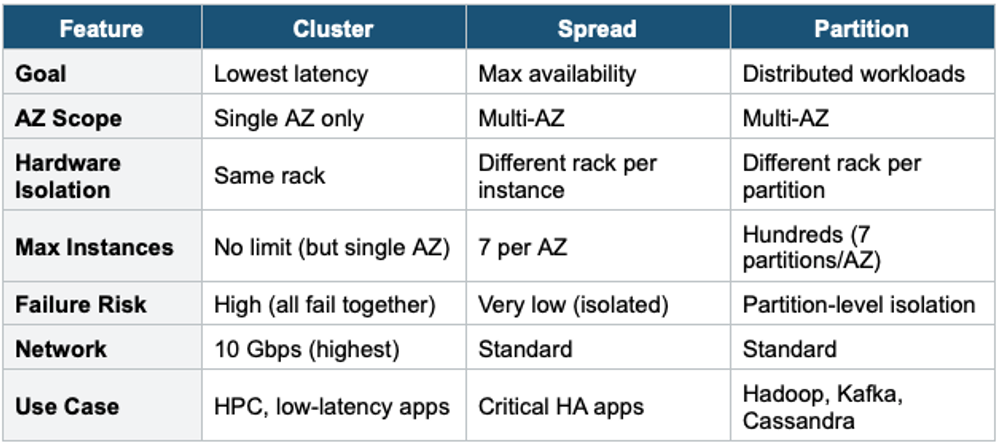
5. Placement Groups Comparison
6. Important Rules
- You cannot merge placement groups
- An instance can only be in one placement group at a time
- You can move an existing instance into a placement group (must be stopped first)
- Not all instance types support all placement group strategies
- Placement groups are free — no additional charges
7. When to use
Use Placement Groups when you need to control how EC2 instances are physically placed on underlying hardware for performance, availability, or both.
Key exam triggers:
- "low latency between instances"
- "high throughput"
- "hardware failure isolation"
- "spread across racks."
- "HPC"
- "big data cluster"
Exam Tip Placement group questions: "Lowest latency between instances" = Cluster. "Maximum fault tolerance, each instance on separate hardware" = Spread. "Large distributed workload like Hadoop/Kafka" = Partition. Cluster = single AZ, high risk. Spread = 7 instances per AZ limit. Partition = up to 7 partitions per AZ, hundreds of instances total.