1. What is Amazon S3?
Amazon Simple Storage Service (S3) is an object storage service that offers virtually unlimited storage with industry-leading durability, availability, security, and performance. It is one of the oldest and most important AWS services.
Core Concept S3 is object storage, not block storage (EBS) or file storage (EFS). Objects (files) are stored in Buckets (containers). S3 is a global service, but buckets are created in a specific Region. S3 offers 99.999999999% (11 nines) durability and 99.99% availability for the Standard class.
2. S3 Buckets
A bucket is a container for objects stored in S3. Every object is stored in a bucket.
Bucket Rules
- Bucket names must be globally unique across ALL AWS accounts worldwide
- Bucket names: 3–63 characters, lowercase letters, numbers, hyphens only
- No uppercase, no underscores, no periods (for best compatibility)
- Buckets are created in a specific Region (data stays in that Region unless you replicate)
- Limit: 100 buckets per account by default (can request increase to 1,000)
- Cannot be renamed after creation — must delete and recreate
Bucket URL Formats
Path-style (legacy):
https://s3.amazonaws.com/my-bucket/photos/cat.jpg

Virtual-hosted-style (standard):
https://my-bucket.s3.amazonaws.com/photos/cat.jpg

Region-specific:
https://my-bucket.s3.us-east-1.amazonaws.com/photos/cat.jpg
3. S3 Objects
An object is a file stored in a bucket plus its metadata. Objects are the fundamental entities stored in S3.
Object Components
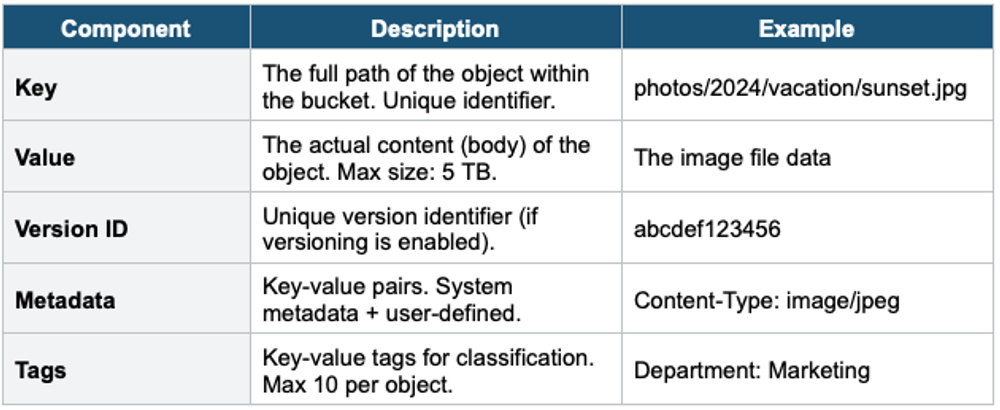
Object Size Limits
- Maximum object size: 5 TB (5,000 GB)
- Single PUT upload limit: 5 GB
- For objects larger than 5 GB, you MUST use Multipart Upload
- AWS recommends Multipart Upload for objects > 100 MB
Multipart Upload Multipart Upload splits a large file into parts, uploads them in parallel, and S3 reassembles them. Benefits: faster (parallel uploads), resilient (retry individual parts), required for > 5 GB. You can start uploading before you know the total file size.
4. S3 Keys (Object Naming)
The Key is the full path to the object within the bucket. S3 is a flat namespace — there are no real folders. The key is simply a string.
Bucket: my-company-data

Key: photos/2024/vacation/sunset.jpg

Breakdown:
  Prefix: photos/2024/vacation/
  Object name: sunset.jpg

The "/" characters make it LOOK like folders in the Console,
but S3 has no folder hierarchy. It's a flat key-value store.
- The "/" in keys creates the illusion of folders in the Console and CLI
- Prefix = everything before the last "/" in the key
- Prefixes are important for performance, lifecycle rules, and access policies
5. S3 Consistency Model
Since December 2020, S3 provides strong read-after-write consistency automatically:
- After a successful PUT of a new object, you immediately get the latest version on GET
- After a successful PUT overwriting an existing object, you immediately get the new version
- After a DELETE, subsequent GET returns "not found" immediately
- LIST operations also reflect changes immediately
- This applies to all S3 operations — no additional cost or configuration needed
Strong Consistency S3 provides strong read-after-write consistency for ALL operations (PUT, DELETE, LIST) at no extra cost. This was a major change in 2020. If the exam asks about S3 consistency, the answer is: strong read-after-write consistency.
6. S3 Versioning
Versioning keeps multiple variants of an object in the same bucket. When enabled, S3 assigns a unique version ID to every object stored.
Key Facts
- Enabled at the bucket level (not object level)
- Once enabled, versioning cannot be disabled — only suspended
- Objects uploaded before versioning have a version ID = null
- Deleting a versioned object adds a "delete marker" (does not actually remove the data)
- You can permanently delete by specifying the version ID
- Protects against accidental deletion and overwrites
MFA Delete
- Requires MFA to permanently delete object versions or change versioning state
- Only the root account can enable/disable MFA Delete
- Can only be enabled via CLI (not Console)
7. S3 Pricing Components
- Storage: per GB/month (varies by storage class)
- Requests: per 1,000 PUT/COPY/POST/LIST or per 1,000 GET/SELECT requests
- Data Transfer OUT: per GB transferred out to the internet (inbound is free)
- Data retrieval: per GB for Glacier classes
7. When to use
Use S3 when you need to store and retrieve any amount of data from anywhere on the internet — it's AWS's core object storage service.
Common scenarios:
- Static file storage — Images, videos, documents, backups.
- Static website hosting — Serve HTML/CSS/JS directly from S3.
- Data lake foundation — Central repository for analytics, ML, and big data.
- Backup and archive — Store backups with lifecycle rules to reduce cost over time.
- Application assets — Store and serve files for web/mobile apps.
- Log storage — Collect logs from CloudTrail, ALB, VPC Flow Logs, etc.
Exam Tip S3 Basics: Bucket names = globally unique. Max object = 5 TB. Use Multipart Upload > 100 MB (required > 5 GB). S3 has strong read-after-write consistency. S3 is flat namespace (no real folders). Versioning cannot be disabled, only suspended. Delete marker = soft delete. MFA Delete = extra protection (root user only, CLI only). Data transfer IN = free.