1. SageMaker Studio
SageMaker Studio is a web-based integrated development environment (IDE) for machine learning. It provides a single interface for the entire ML workflow.
Core Concept
Studio = one-stop shop for ML. Write code in notebooks, manage experiments, train models, deploy endpoints, and monitor performance — all from one browser-based IDE. No separate tools or context switching. Each user gets their own isolated environment.
Key Features
- Jupyter-based notebooks with managed compute (no EC2 setup)
- Integrated with all SageMaker components: Training, Endpoints, Pipelines, Experiments
- Multi-user: each team member gets an isolated environment within a shared domain
- Pre-built Docker images: TensorFlow, PyTorch, MXNet, Scikit-learn, Hugging Face
- Git integration: connect to GitHub, GitLab, Bitbucket, CodeCommit
- Collaboration: share notebooks, experiments, and models
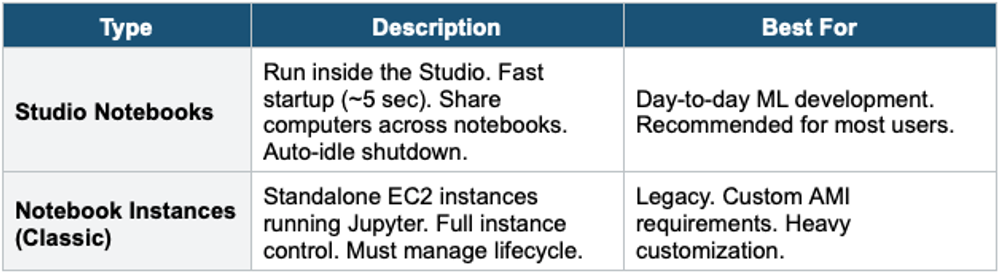
2. SageMaker Notebooks
3. SageMaker Canvas
- No-code ML for business users (no programming needed)
- Point-and-click: import data, select target column, Canvas builds + trains + evaluates model
- Supports: classification, regression, time-series forecasting, NLP, computer vision
- Connect to: S3, Redshift, local files
- One-click deployment to SageMaker endpoint
- Use for: business analysts who need ML predictions without coding
4. SageMaker Data Wrangler
- Visual data preparation and feature engineering tool
- 300+ built-in transformations: join, filter, encode, normalize, impute, custom SQL/PySpark
- Import from: S3, Athena, Redshift, Lake Formation, Snowflake
- Data quality insights: statistics, distributions, correlations, target leakage detection
- Export: to SageMaker Processing, Pipelines, Feature Store, or S3
- Use for: data scientists preparing training data without writing boilerplate code
5. When to use
Use these when you need a managed IDE and notebook environment to build, train, and deploy machine learning models on AWS.
Key exam triggers:
- "ML development environment"
- "Jupyter notebooks on AWS"
- "build and train ML models."
- "data science workspace"
- "managed notebook"
Common scenarios:
- Data scientists exploring and visualizing data.
- Build, train, and tune ML models interactively.
- Collaborate across ML teams in a shared environment.
- Full ML lifecycle — from data prep to model deployment.
Exam Tip
Studio & Notebooks: "ML IDE" = SageMaker Studio. "No-code ML" = SageMaker Canvas. "Visual data prep" = Data Wrangler. "Classic Jupyter" = Notebook Instances (legacy). Studio Notebooks = fast startup, recommended. Canvas = business analysts. Data Wrangler = feature engineering.