1. Overview
VPC Flow Logs capture metadata about IP traffic flowing through network interfaces in your VPC. They are essential for security monitoring, troubleshooting connectivity issues, and compliance auditing.
What Flow Logs Capture Flow Logs record: source/destination IP, source/destination port, protocol, packet count, byte count, start/end time, and the ACTION (ACCEPT or REJECT). They do NOT capture packet contents (not a packet sniffer). They capture metadata only.
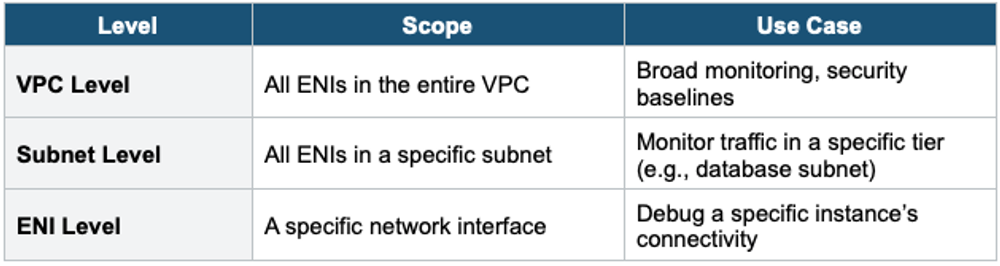
2. Flow Log Levels
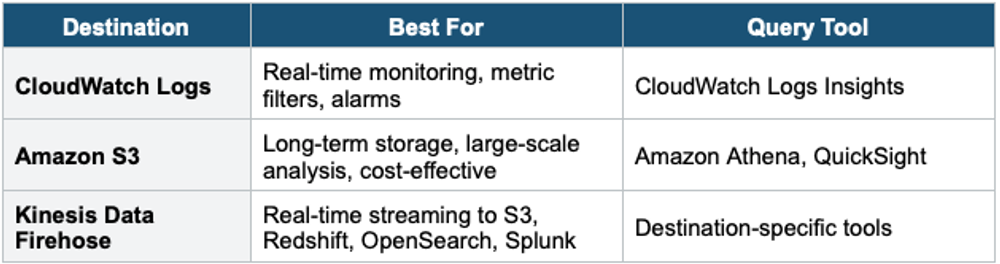
3 Flow Log Destinations
4. Flow Log Record Format
Default Flow Log Record (v2):

version account-id interface-id srcaddr dstaddr
srcport dstport protocol packets bytes start end action log-status

Example:
2 123456789012 eni-abc123 10.0.1.5 52.94.76.89
49152 443 6 20 4000 1620000000 1620000060 ACCEPT OK

Decoded:
  Source: 10.0.1.5:49152 (private instance, ephemeral port)
  Dest:   52.94.76.89:443 (HTTPS to an AWS service)
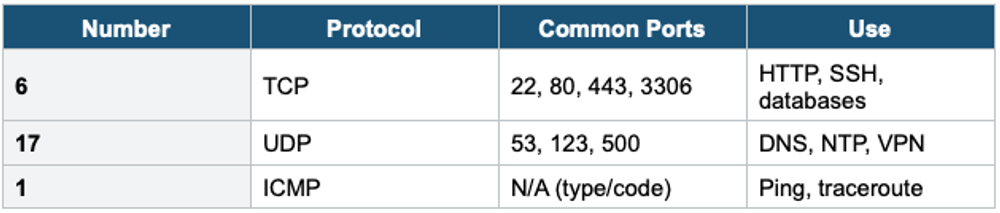
  Protocol: 6 = TCP
  Packets: 20, Bytes: 4000
  Action: ACCEPT (allowed by SG + NACL)

Custom fields (v5) can include: vpc-id, subnet-id, instance-id,
tcp-flags, pkt-srcaddr, pkt-dstaddr, region, az-id, and more.
5. Common Protocol Numbers
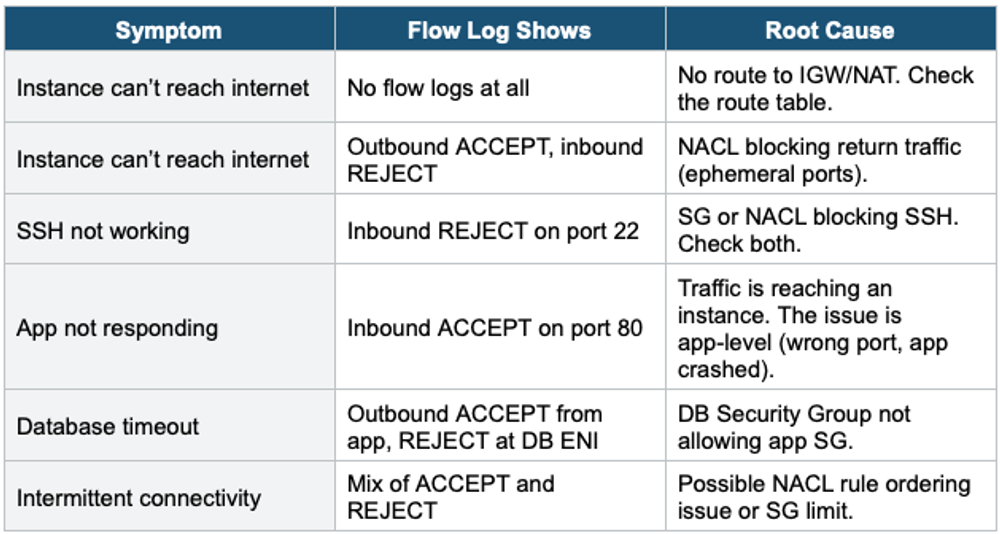
6. Troubleshooting with Flow Logs
7. What Flow Logs Do NOT Capture
- DNS requests to Amazon Route 53 Resolver (use Route 53 Resolver query logs instead)
- Traffic to Amazon DNS server (169.254.169.253)
- Instance metadata traffic (169.254.169.254)
- DHCP traffic
- Traffic to the reserved IP of the VPC router (e.g., 10.0.0.1)
- NTP traffic to Amazon Time Sync (169.254.169.123)
- Traffic between a Network Load Balancer ENI and an endpoint ENI
8. Flow Logs + Athena
-- Find top talkers (most data transferred)
SELECT srcaddr, dstaddr, SUM(bytes) as total_bytes
FROM vpc_flow_logs
WHERE action = 'ACCEPT'
GROUP BY srcaddr, dstaddr
ORDER BY total_bytes DESC
LIMIT 10;

-- Find rejected traffic (potential attacks)
SELECT srcaddr, dstaddr, dstport, COUNT(*) as attempts
FROM vpc_flow_logs
WHERE action = 'REJECT'
GROUP BY srcaddr, dstaddr, dstport
ORDER BY attempts DESC
LIMIT 20;
9. Traffic Mirroring
For full packet capture (not just metadata), use VPC Traffic Mirroring:
- Copies actual network traffic from an ENI to a target (NLB or another ENI)
- Full packet capture: headers + payload (not just metadata like Flow Logs)
- Use for: deep packet inspection, threat detection, content analysis, forensics
- Filter by source/dest IP, protocol, port
- Send to third-party security appliances (IDS/IPS) for analysis
- More expensive than Flow Logs (data processing + target infrastructure)
10. When to use
Use VPC Flow Logs when you need to capture and analyze IP traffic metadata flowing through your VPC network interfaces.
Common scenarios:
- Troubleshoot connectivity — Find out why traffic is being rejected.
- Security monitoring — Detect suspicious traffic patterns or unauthorized access attempts.
- Compliance auditing — Prove network activity is logged for regulatory requirements.
- Network analysis — Understand traffic patterns, bandwidth usage, and top talkers.
- Incident investigation — Trace network activity after a security event.
Exam Tip VPC Flow Logs: metadata only (not packet contents). 3 levels: VPC, Subnet, ENI. 3 destinations: CloudWatch, S3, Firehose. ACCEPT = allowed, REJECT = blocked. "Inbound ACCEPT + outbound REJECT" = NACL issue (ephemeral ports). "ACCEPT but app fails" = app-level issue. Does NOT capture DNS/DHCP/metadata traffic. For full packet capture = Traffic Mirroring (not Flow Logs). Query in S3 with Athena.