1. What is a VPC?
A Virtual Private Cloud (VPC) is a logically isolated virtual network within AWS that you define. It gives you full control over your networking environment: IP address range, subnets, route tables, and network gateways.
Core Concept A VPC is your private network in AWS. Every resource you launch (EC2, RDS, Lambda in VPC, etc.) lives inside a VPC. You control who can access it, how traffic flows, and how it connects to the internet or other networks. Think of a VPC as your own data center network in the cloud.
2. VPC Key Facts
- Region-specific: a VPC spans all AZs in a single Region
- CIDR block: You define the IP range when creating the VPC (e.g., 10.0.0.0/16)
- Max 5 VPCs per Region (soft limit, can request increase)
- CIDR range: /16 (65,536 IPs, largest) to /28 (16 IPs, smallest)
- You can add secondary CIDR blocks to an existing VPC
- Default VPC: AWS creates one per Region with pre-configured subnets, IGW, and route tables
- Custom VPC: You create and configure everything from scratch
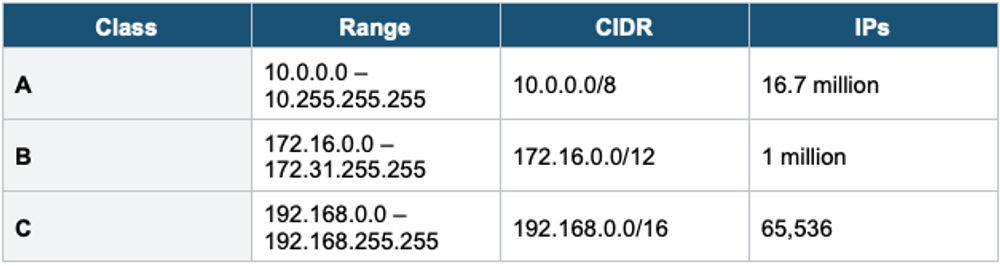
Private IPv4 Ranges (RFC 1918)
3. Subnets
A subnet is a range of IP addresses within your VPC. Subnets are tied to a single Availability Zone. You use subnets to segment your network into public and private tiers.
Key Facts
- Each subnet exists in exactly ONE AZ (cannot span AZs)
- A subnet’s CIDR block must be a subset of the VPC’s CIDR block
- Subnet CIDRs cannot overlap with each other within the same VPC
- AWS reserves 5 IP addresses in every subnet (first 4 + last 1)
Reserved IPs (5 per Subnet)
Example Subnet: 10.0.1.0/24 (256 IPs, but only 251 usable)

10.0.1.0   ─ Network address
10.0.1.1   ─ VPC router (reserved by AWS)
10.0.1.2   ─ DNS server (reserved by AWS)
10.0.1.3   ─ Reserved for future use
10.0.1.255 ─ Broadcast address (AWS does not support broadcast)

Usable IPs: 256 - 5 = 251
Public vs Private Subnets
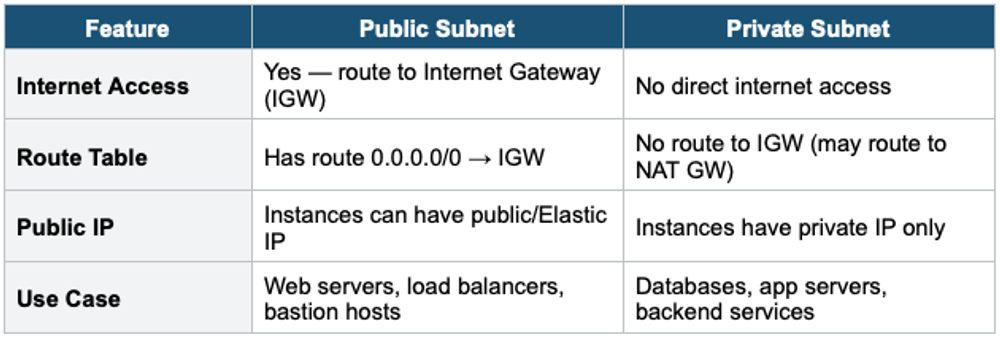
What Makes a Subnet Public? A subnet is public if its route table has a route sending 0.0.0.0/0 (all internet traffic) to an Internet Gateway. The subnet itself doesn’t have a “public” flag — it’s the route table that determines public vs private. Instances in a public subnet also need a public IP or Elastic IP to communicate with the internet.
4. Internet Gateway (IGW)
- Allows communication between instances in your VPC and the internet
- Horizontally scaled, redundant, and highly available (managed by AWS)
- One IGW per VPC. Attached at the VPC level, not the subnet level.
- Performs Network Address Translation (NAT) for instances with public IPs
- Does NOT limit bandwidth — scales automatically
- Must be explicitly attached to a VPC (not automatically attached to custom VPCs)
IGW Flow: Instance to Internet
Outbound: Instance (private IP) → Route Table → IGW → Internet
  Route table entry: 0.0.0.0/0 → igw-abc123
  IGW translates private IP to public/Elastic IP

Inbound: Internet → IGW → Route Table → Instance
  IGW translates public IP back to private IP

Requirements for internet access:
  1. IGW attached to VPC
  2. Route table: 0.0.0.0/0 → IGW
  3. Instance has a public IP or an Elastic IP
  4. The security group allows the traffic
  5. NACL allows the traffic
5. Route Tables
A route table contains rules (routes) that determine where network traffic is directed. Every subnet must be associated with a route table.
Key Facts
- Each VPC has a Main Route Table (default for all subnets not explicitly associated)
- You can create custom route tables and associate them with specific subnets
- A subnet can only be associated with ONE route table at a time
- A route table can be associated with MULTIPLE subnets
- Most specific route wins (longest prefix match): /32 > /24 > /16 > /0
Route Table Example
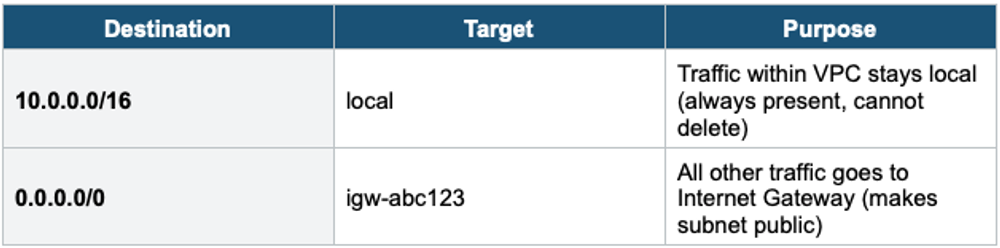
Private Subnet Route Table

6. Elastic IP Addresses
- A static public IPv4 address that you allocate and can associate with any instance or ENI
- Persists even if the instance is stopped (unlike auto-assigned public IPs, which change on stop/start)
- 5 Elastic IPs per Region per account (soft limit)
- You are charged if an Elastic IP is NOT associated with a running instance (to discourage waste)
- Use for: instances that need a fixed public IP (NAT instances, bastion hosts)
7. VPC Architecture Pattern
Standard 3-Tier VPC Architecture:

VPC: 10.0.0.0/16
├── Public Subnet (10.0.1.0/24) ─ AZ-a
│   ├── ALB, Bastion Host, NAT Gateway
│   └── Route: 0.0.0.0/0 → IGW
├── Public Subnet (10.0.2.0/24) ─ AZ-b
│   ├── ALB, NAT Gateway
│   └── Route: 0.0.0.0/0 → IGW
├── Private Subnet (10.0.3.0/24) ─ AZ-a
│   ├── App servers (EC2/ECS)
│   └── Route: 0.0.0.0/0 → NAT GW in AZ-a
├── Private Subnet (10.0.4.0/24) ─ AZ-b
│   ├── App servers (EC2/ECS)
│   └── Route: 0.0.0.0/0 → NAT GW in AZ-b
├── Private Subnet (10.0.5.0/24) ─ AZ-a
│   ├── RDS Primary, ElastiCache
│   └── No internet route (data tier)
└── Private Subnet (10.0.6.0/24) ─ AZ-b
    ├── RDS Standby
    └── No internet route (data tier)

Internet Gateway attached to VPC
8. When to use
Use these when you need to build and control the network layer for your AWS resources.
Common scenarios:
- Isolate your resources — Create a private network in AWS where you control access.
- Separate public and private tiers — Web servers in public subnets, databases in private subnets.
- Control traffic flow — Define which subnets can reach the internet and which cannot.
- Multi-AZ architectures — Spread subnets across AZs for high availability.
- Connect to on-premises — Use VPC as the foundation for VPN or Direct Connect.
Exam Tip VPC Lesson 1: VPC = Region-scoped. Subnet = AZ-scoped. 5 IPs reserved per subnet. Public subnet = route to IGW + public IP. IGW = 1 per VPC, no bandwidth limit. Route table: most specific route wins. Elastic IP = static public IP (charged when unused). The default VPC has everything pre-configured. Custom VPC = you build from scratch. "Instance can’t reach the internet" = check: IGW attached? Route to IGW? Public IP? SG? NACL?